Day 2: AI-Powered Job Scraper & Cover Letter Generator
🧠 Project Name: Automating Job Screening & Cover Letters with AI — My Full Set
🔧 What This Workflow Does:
An AI-powered system that can take scraped job listings, clean and summarize the job descriptions, and then generate personalized cover letters based on your resume — all automated and free.
✅ Tools Used:
- Apify (cloud platform for web scraping)
- Make.com (automation tool)
- Flask API (Python) (Custom backend for summarization & cover letter generation)
- Ngrok (secure and reliable connection between the public endpoint and my local machine)
- HuggingFace (AI pipelines for summarization and text generation)
- Slack (to receive drafts)
Step-by-Step Tutorial 🗂️
🔹 Step 1 & 2: Scrape Jobs with Apify and Send to Make
I started by scraping job listings from LinkedIn using Apify, which is an easy-to-use web scraping platform. Apify collects data like Job title, Company name, and Job description. The output is raw JSON data, which needs cleaning.
*First, get your Apify API Token and set up the Apify connection in Make.com.*
1. Trigger Module: Apify -> Run an Actor
Insert a JSON query to specify job parameters (e.g., location: Denmark, query: Marketing, remote: 1, time_interval: ANY).
2. Pull the Scraped Data: Apify -> Get Dataset Items
Use the Dataset ID output from the previous step and set a Limit (e.g., 10). This converts the raw JSON into Make-friendly data arrays.
3. Insert a “Set Variable” module
Set the variable name to `jobs` and the value to the entire output from "Get Dataset Items".
4. Add an Iterator Module
Add Tools > Iterator. In the "Array" field, choose the `jobs` variable from the Apify output. This breaks down the job posts into individual rows for processing.
🔹 Step 5: Transforming raw data into JSON code
This step formats raw job data into a proper JSON string for further processing. This is critical because the AI model expects structured data.
*Add Json > Transform to JSON and map the fields with the IDs from Apify.*
📥 Example input format required by AI: `job_description: ...`, `resume: ...`, `job_title: ...`, `company: ...`
🔹 Step 6: Clean the job description by removing unnecessary text
A problem often encountered on LinkedIn is having to click “See More” to view the full job description. The raw JSON output includes these messy spaces, which are problematic for clean code.
*I cleaned this manually by adding a Text Parser > Replace module to remove unnecessary text using regex.*
🔹 Step 7: Format the clean JSON code
*Add a JSON -> Parse JSON module. This parses the cleaned JSON data into a structured format for easier access later in the scenario.*
🔹 Step 8: Add an HTTP module to send the job description
I chose to create my own AI interface locally to save costs and run open-source models. I used three key tools: Flask, Hugging Face, and Ngrok.
🧪 Flask: A lightweight Python web framework used to build a small server that listens for job data (title, description, resume) and returns a summary + a custom cover letter.
🧠 Hugging Face: Used DistilBART for summarizing long job posts and GPT-2 for text generation (writing the cover letter based on the summary + resume). *Everything runs locally—no paid APIs.*
🌍 Ngrok: Used to create a temporary public URL for my local Flask server so Make.com could send data to it.
HTTP Module Configuration:
- Module: “Make a request”
- Method: POST
- URL: `https://
.ngrok-free.app/summarize` - Headers: `Content-Type: application/json`
- Body type: Raw
- Raw JSON: Insert the full JSON query, mapping the variables from the previous JSON module (e.g., `"job_description": "{{11.job_description}}"`) to send to the Flask endpoint.
🔹 Step 9 & last one: Add a Slack module to receive the final output
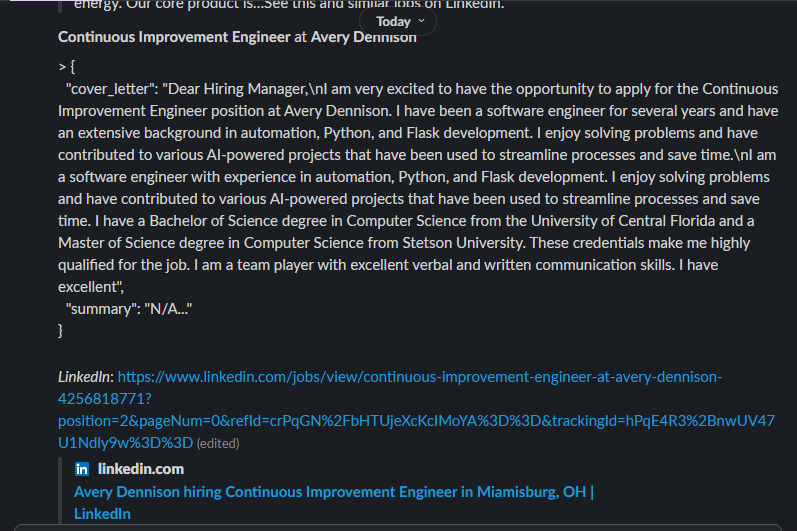
The final output from the Flask API (the cover letter and summary) is then received via a final Slack module in Make.com.
*Set up a new Slack app and Webhook URL, then configure the Slack > Send a Message (via webhook) module to map the final AI-generated content.*
🎯 Final Output
The result is a fully automated job screening and cover letter generation tool:
- Takes job posts from Apify (scraped automatically).
- Cleans and transforms messy job data into valid JSON.
- Sends it to my local Flask server exposed via Ngrok.
- AI (from Hugging Face) summarizes the job and writes a custom cover letter.
- The final output (cover letter + summary) gets posted to Slack for review.
✅ No paid APIs | ✅ Runs on my machine | ✅ Works with any job post + resume