Day 10: Real-Time Customer Journey Enrichment
🧠 Project Name: Clay + Make.com Automation: Real-Time Customer Journey Enrichment
🔧 What This Workflow Does:
This automation pipeline connects Make.com with Clay to build a system that enriches and visualizes customer interactions in real-time. Using user behaviors (email opens, demo bookings, support tickets, churn), the system uses GPT to map key pain points and suggest actionable improvements for the customer journey.
✅ Tools Used:
- Make.com – To send form or webhook data into Clay automatically
- Clay – For dynamic tables, AI enrichment (via GPT), and journey mapping
- Google Gemini / OpenAI – For interpreting customer data and generating insights
- Custom CSV – Used as a starting point for demonstration
Flow Overview ⚙️
In this automation, customer interaction data is pushed to Clay, where AI analyzes the journey and outputs a summary and improvement suggestions.
🔹 Step 1: CSV Upload or Webhook Trigger
The process starts by either uploading a dummy CSV or triggering data collection through a webhook (e.g., form submission).
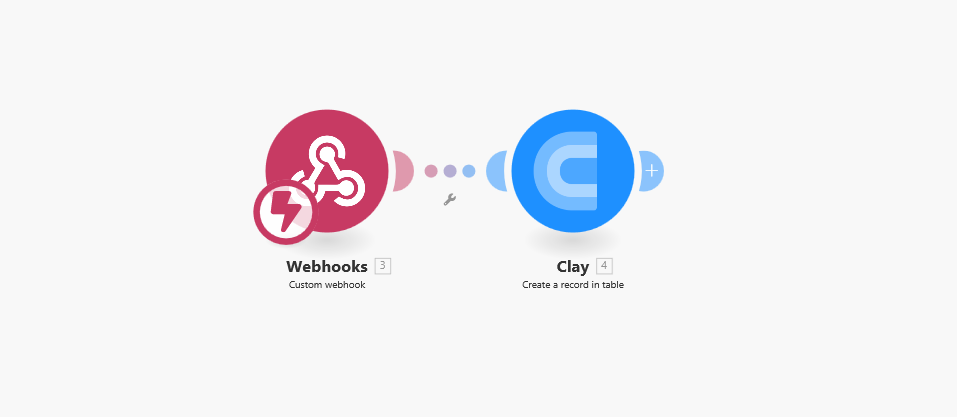
🔹 Step 2: Data Pushed to Clay
Make.com sends each customer record into Clay using Clay’s webhook URL and API token.
🔹 Step 3: Lead Scoring
The Clay table includes fields that capture the customer journey, indicating key interactions:
- Signup Date
- Opened Email
- Booked Demo
- Support Ticket
- Churned
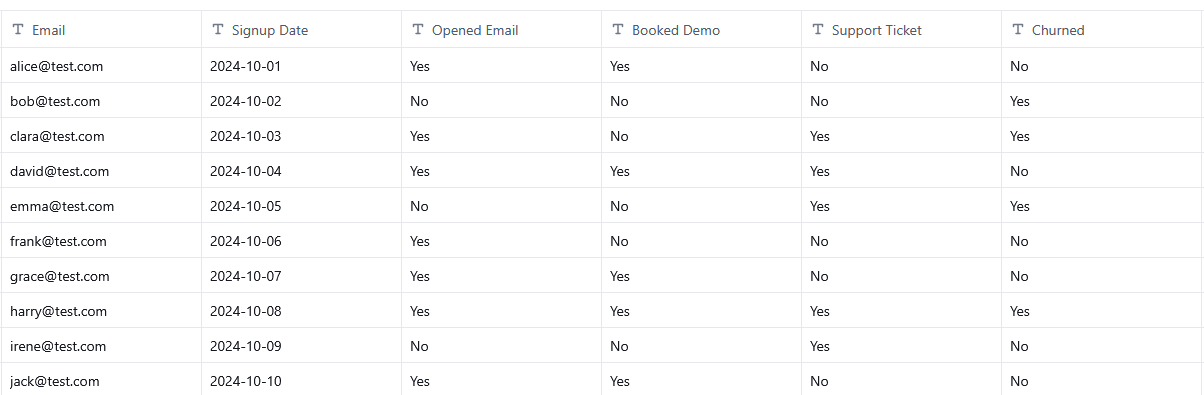
🔹 Step 4: AI-Powered Analysis in Clay
Clay uses GPT to analyze each customer’s journey and outputs: Sentiment, Pain Points, and Improvement Opportunities.
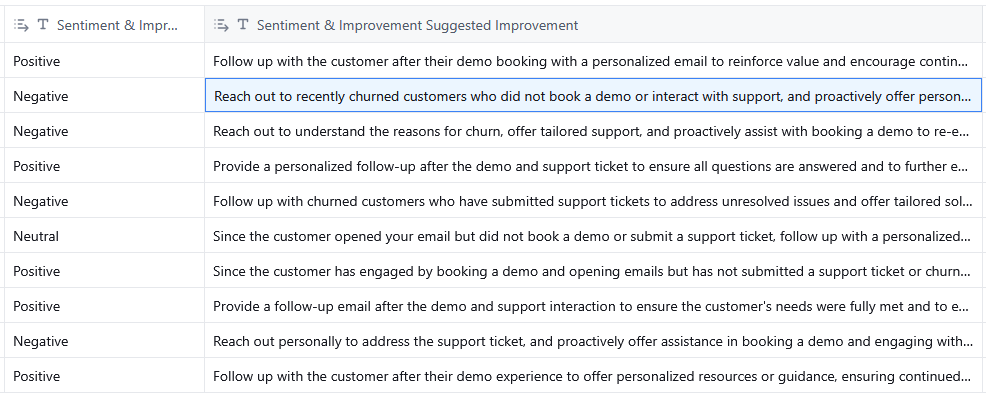
Prompt Used:
Based on the answers in columns /Opened Email, /Booked Demo, /Support Ticket, /Churned, create a sentiment analysis for each customer. Based on this feedback and interaction type, suggest one specific way to improve the experience for the customers.
Suggested Output Format (Structured JSON):
{ "type": "object", "properties": { "sentiment": { "type": "string", "enum": [ "Positive", "Neutral", "Negative" ], "description": "Overall sentiment based on customer responses" }, "suggested_improvement": { "type": "string", "description": "One actionable and specific improvement tailored to the customer's experience" } }, "required": [ "sentiment", "suggested_improvement" ] }
Optional Outputs:
Insights can be pushed to Slack, email, or CRM based on logic, allowing for proactive intervention.
💡 Why This Matters
- You get instant visibility into each user’s path.
- AI helps uncover patterns that humans might miss.
- You can take proactive action to reduce churn or improve onboarding.